
As agents write more of the code we ship, evidence about whether to trust their output matters more than the code itself. Producing a change is no longer the slow part. Deciding whether that change should reach users is.
SuperQode is the harness layer for coding agents. The Q stands for Quality.
Build with any agent. Verify with SuperQode. Decide what ships.
Today we are making SuperQode for macOS available as a public beta for Apple Silicon Macs. We are also introducing SuperQode Pro: release confidence for agent-built software, now open to paid design partners.
What SuperQode is
SuperQode is a full coding agent. You can open a project, ask for a change and build software in it directly.
It also works with the agents and models you already use. You can connect an existing subscription, an ACP agent, an API provider or a local model running through Ollama, and keep working in one place.
And it evaluates and improves harnesses with evidence.
A harness is everything around the model that decides how an agent works: the prompts, tools, routing rules, budgets and checks. Two teams using the same model can get very different results because their harnesses differ. SuperQode lets you run a harness, compare it against alternatives on your own tasks, and keep the change only when the evidence supports it.
Many coding agents invest heavily in code review. SuperQode keeps review light and focuses on the final release decision: ship or hold. That decision belongs to a person, and it should rest on evidence rather than on reading every diff by hand.
SuperQode for macOS, shipped today
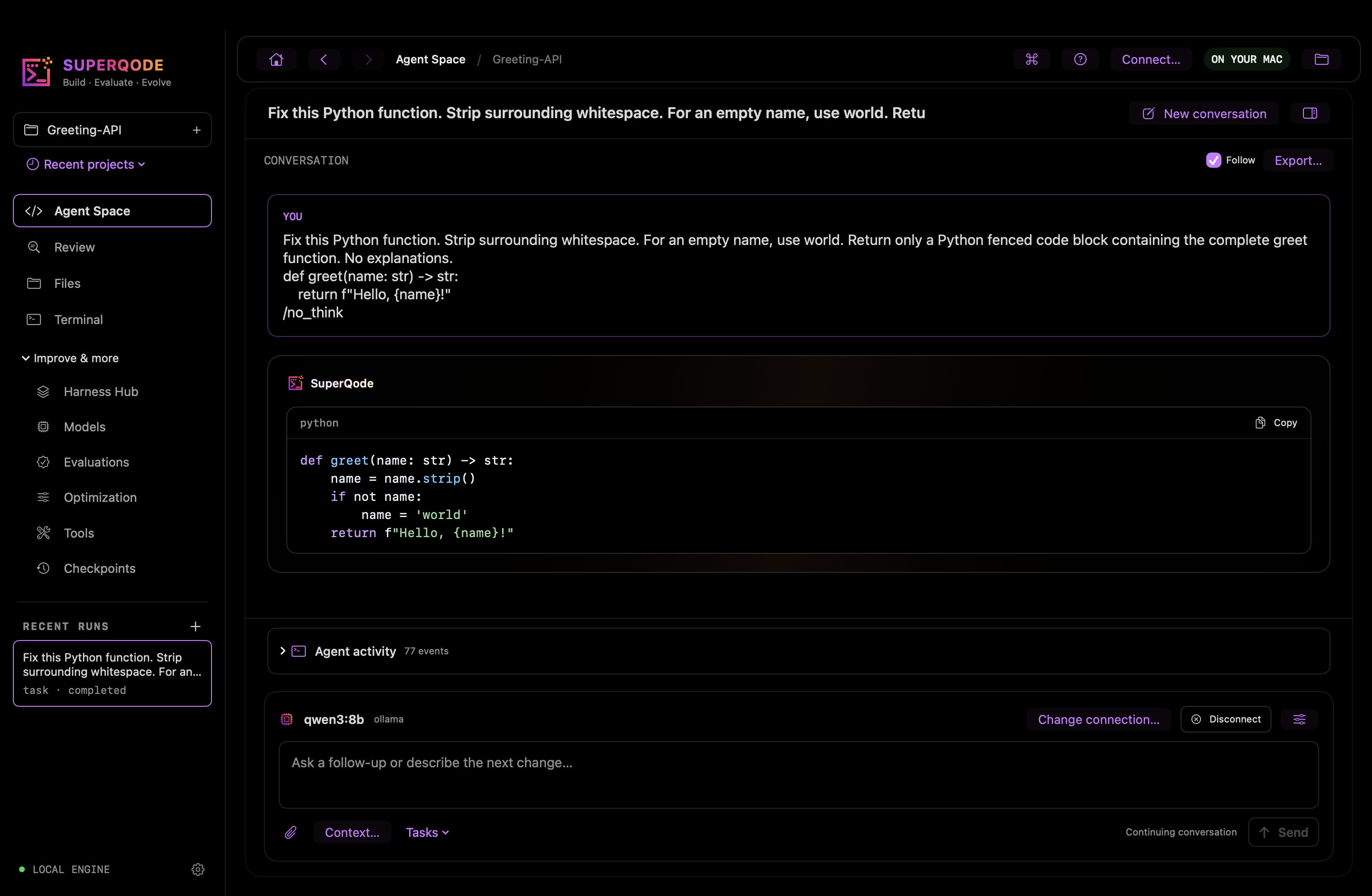
The Mac app is a public beta for Apple Silicon Macs running macOS 14 or later. It ships as a signed DMG, notarized by Apple, downloaded directly from superqode.dev. The Python engine is bundled, so the app needs no separate Python installation. It talks to that engine locally and does not require a SuperQode account. Updates are manual.
Here is what is in the app today:
- Agent Space. The main workspace. Ask an agent for a change and follow its activity as it works.
- Connections. Connect the agent or model you already use, including existing subscriptions, ACP agents, API providers and local models via Ollama.
- Files and Terminal. Browse and edit project files, and use a project terminal without leaving the app.
- Review. Inspect diffs for this turn, uncommitted work or the whole branch, and leave line feedback. Light by design.
- Checkpoints. Return to earlier project states.
- Harness Hub. Browse harness definitions and send one straight to Evaluations or Optimization.
- Models and Tools. See and configure what your agents can use.
- Evaluations. Compare a baseline with up to eight explicitly selected candidate harnesses. See per-task changes, including which tasks fail. Choose held-in (development) or held-out (validation) splits. Before a run, suite checks warn you when tasks only use smoke grading.
- Saved experiments. Reopen evaluation and optimization evidence from project history without launching a new run.
- Guided routing tuning. Available since late October. Work in saved rounds, review labels and rationales, and make verified candidate decisions.
- Optimization. A candidate only passes its gate with complete, non-smoke evidence from held-out tasks.
To learn the tuning flow without spending anything, the app includes an offline practice set of 12 synthetic routing examples. It is practice only: it is not benchmark evidence and it cannot authorize adopting a candidate. Real tuning starts when you prepare reviewed examples from your own project.
What's new in the latest update
- SuperQode Pro Preview in Settings. A new section walks through the release-confidence workflow, with an illustrative "hold for review" example that shows the shape of a release summary.
- Welcome tagline restored. The Welcome screen once again reads "The harness layer for coding agents".
- Project opening fix. Opening a saved project from Welcome now enters its workspace, and saved tabs and drafts are kept.
Evidence in the CLI: SuperGauge and Agent Quality Records
The open source CLI already produces evidence you can put in a pipeline. The sq gauge commands work with Agent Quality Records:
sq gauge runruns a harness spec against a task file and writes an Agent Quality Record.sq gauge gatechecks a record against a level and exits non-zero when it falls short. With--require-ship, it also requires a recorded ship approval. Use it as a CI step.sq gauge showprints a summary of a record.sq gauge verifyrecomputes what can be checked offline: the harness digest against the spec, and whether the referenced ledger is present.
Today, the open source CLI can create an Agent Quality Record, gate a CI job on it, show it and verify its harness digest and ledger offline. It does not sign records.
The record format follows SuperGauge, an open draft spec for Agent Quality Records, published at https://super-agentic.ai/super-gauge. SuperGauge levels L1 to L4 are levels in a draft specification. They describe how much evidence a record carries. They are not a certification and we do not certify anyone against them.
Your CI still runs your tests. The gate adds a different question: can you trust what your agents did, and has someone accountable approved it? SuperQode does not replace your CI or your QA team. It replaces the manual checking of agent work that currently sits between them.
SuperQode Pro adds signed records bound to a specific commit.
Introducing SuperQode Pro
Release confidence for agent-built software. Now accepting paid design partners.
Pro is built for the moment a release owner has to say ship or hold. It puts the exact release candidate, the evidence and the approval in one record, so the decision can be checked later by anyone who needs to.
What Pro does:
- Verify the deliverable. Check the exact release candidate against the requirements your team agreed.
- Review the evidence. See what passed, what failed and what remains unverified before you decide.
- Record the decision. Link artifact identity, evidence and approval in one quality record.
- Protected verification. Enforce evaluator independence, so the agent that wrote a change is not the one that grades it.
- Signed, commit-bound records. Quality records tied to a specific commit and signed.
- Release decision view. The ship or hold decision, in pull requests and in the Mac app.
- Team rules and approvals. Rules, approvals and history for release owners.
- Leadership reports. Reporting for engineering leadership on what shipped, what was caught and what it cost.
Pro is designed around the people involved in a release. Developers work with it daily and see ship or hold. The release owner, usually a tech lead, engineering manager or QA lead, controls the gate and makes the final call on held work. A Head of AI or VP Engineering reads the reports. Product owners get a read-only, plain-language view.
Pro is a proprietary product and is not part of the open source repositories. The open source CLI and the Mac app stay available as they are today.
| Edition | What you get |
|---|---|
| Community (open source, available now) | Native Mac app, coding agent, agent and model connections, evaluations, optimization, guided tuning, and sq gauge Agent Quality Records in the CLI |
| SuperQode Pro (with design partners) | Verified deliverables, evidence review, recorded release decisions, protected verification, signed commit-bound records, release decision view, team rules and approvals, leadership reports |
| Release Confidence Pilot (available now) | A paid, assisted engagement on one of your repositories, delivered alongside Pro development |
The SuperQode Release Confidence Pilot
If you lead engineering or quality and agents already write part of your code, the Release Confidence Pilot is how you start with SuperQode Pro today.
We take one repository and a set of representative changes, agree the acceptance criteria with your release owner, review the evidence together and deliver a report. The pilot works alongside your existing checks and CI. It does not guarantee bug-free software or remove human review.
It is a paid, assisted engagement. Pricing is discussed privately. Apply at https://superqode.dev/partners.
Current Limitation
- This is a public beta for Apple Silicon Macs running macOS 14 or later. There is no Intel build.
- Updates are manual: quit the app, download the newer DMG and replace the app. There is no automatic updater.
- The Mac app does not have full parity with the terminal interface. Some advanced workflows use typed forms.
- Integrations depend on the installed agent, its version and your account. Some are experimental.
- The app is not an OS sandbox. Agent tools and the terminal run as your macOS user. Use backed-up or disposable repositories.
- Evaluations and optimization can make paid model requests. Review budgets before starting them.
- Quality records from the CLI are unsigned, and SuperGauge is a draft spec.
- SuperQode Pro is delivered through design partner pilots. The Settings page in the Mac app is a preview with an illustrative example.
- The sidebar still shows the older "Build · Evaluate · Evolve" tagline. The Welcome screen shows the current one.
Get started
Developers: download the beta and try it on a small project.
Get the signed, notarized DMG from https://superqode.dev and drag SuperQode to Applications. Open a disposable or backed-up Git repository, connect the agent or model you already use (or a local model through Ollama), ask for a small change and review the diff. Then try an evaluation.
The CLI requires Python 3.12 or 3.13. If you already have it installed, upgrade with:
superqode update
# or
uv tool upgrade superqode
Engineering and quality leads: apply for the Release Confidence Pilot at https://superqode.dev/partners.
Build with any agent. Verify with SuperQode. Decide what ships.